
Dynamic clips
CDynamicClipEntity objects are invisible boxes that collide with the player, with enemies, or both. Use them as invisible walls, floors and ceilings. They are listed under Clips in the object tree, and drawn in the scene by default through the Dynamic Clips camera layer.
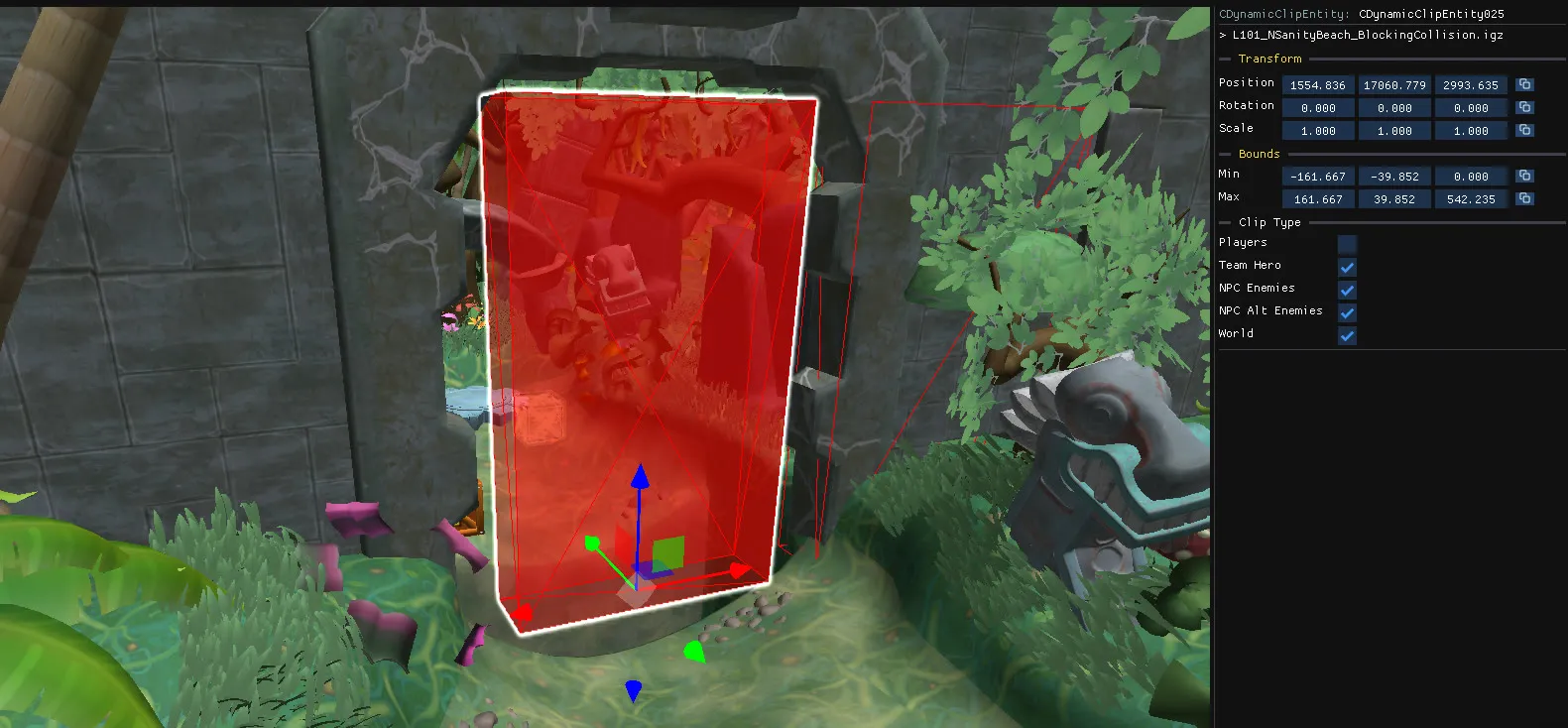
Create a dynamic clip
Section titled “Create a dynamic clip”Right-click in the scene and choose Other → Dynamic Clip.
Alternatively, you can click on a static object with no collision to create a new dynamic clip with the correct position, rotation and scale. See collision editing
You can also use Other → Dynamic Clip Switch to create a clip with on and off triggers, so the wall can be enabled and disabled during play.
Edit a dynamic clip
Section titled “Edit a dynamic clip”- Move, rotate and scale it using the
Boundssection on the right panel or using gizmos.
Working around clips
Section titled “Working around clips”Clicks in the scene pass through clips that are already selected, so you can reach the objects inside or behind them. Pasted objects collide with dynamic clips, which means you can paste a crate onto an invisible floor and have it land on it.