
Object tree and camera layers
The object tree
Section titled “The object tree”The left column lists every object of the level, grouped by type.
Click an entry to open its properties, double-click to focus the camera on it, hold Shift to select several entries.
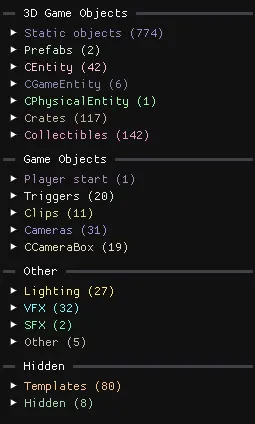
3D Game Objects
Section titled “3D Game Objects”| Group | Contents |
|---|---|
| Static objects | The static models that make up most of the level’s geometry, sometimes with baked-in collisions. See Static models. |
| Prefabs | Instantiated prefab entities. See Prefab instances. |
| CEntity / CGameEntity / CPhysicalEntity | Most game objects and spawners: enemies, hazards, platforms… See Spawner templates. |
| CActor | Character entities such as bosses and mounts. |
| Crates | Every crate in the level. |
| Collectibles | Every collectible in the level. |
Game Objects
Section titled “Game Objects”| Group | Contents |
|---|---|
| Player start | The entity where the character spawns when the level starts. |
| Triggers | Trigger zones. See Script triggers. |
| Clips | Collision boxes. See Dynamic clips. |
| Cameras | Every type of camera. |
| CCameraBox | Camera transitions. |
| Group | Contents |
|---|---|
| Lighting | Light sources and visual boxes. See Lighting and skybox |
| VFX | Visual effects. |
| SFX | Sound effects and music. See Music and audio. |
| Other | Every other entity without a model, such as the WorldInstance, default visual settings and the level border collisions. |
Hidden
Section titled “Hidden”| Group | Contents |
|---|---|
| Templates | Template objects. See Spawner templates. |
| Hidden | Hidden objects. |
Camera layers
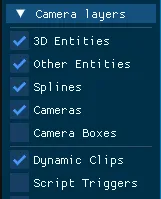
Section titled “Camera layers”The Camera layers header at the top of the scene view chooses which categories of objects are drawn. Hiding layers cleans up the view and improves performance. Most hidden layers still show the objects that are part of the current selection. Your choice of layers is saved when you close the editor.
| Layer | Shows | Useful when |
|---|---|---|
| Camera Boxes | Transition zones between two cameras | Adjusting camera transitions |
| Dynamic Clips | CDynamicClipEntity collisions |
Placing invisible walls and floors |
| Script Triggers | CScriptTriggerEntity volumes |
Debugging objects that do not spawn in-game |
| Trigger Volumes | The bounds of CTriggerVolumeBox components |
Adjusting what triggers an object behaviour |
| Static Collisions | The precise collision geometry of static models | Checking where the player can actually walk |
| Border Collisions | The optimised level border collisions | Finding invisible walls. See Border collisions |
| Audio Boxes | The bounds of ambient audio zones | Adjusting where a sound plays |
| Visual Boxes | The bounds of visual data boxes | Adjusting the main lighting |
| Box Lights, Point Lights, Tint Lights | The bounds of each light type | Adjusting lighting |
| Templates | Template objects | Editing the few enemies whose template position matters |
Templates located at (0,0,0) are hidden even when the Templates layer is on, to keep the frame rate up.
Debug modes
Section titled “Debug modes”Editor settings → Debug mode highlights objects with a colour overlay:
| Mode | Highlights |
|---|---|
| Prefabs | Prefab instances and entities that belong to a prefab |
| Game Objects | Every game object: enemies, hazards, platforms… |
| Havok Objects | Highlight objects that have static collision data. |
| Havok Materials | Colors static collision triangles according to their material index (dirt, ice…) |
| Havok Sections | Colors static collision triangles according to their BVH section index. |
| Havok Primitives | Colors static collision triangles according to their BVH primitive index. |