
Quick-access menu
Right-click anywhere in the scene view to open the quick-access menu. New objects are created where the central dot is aiming.
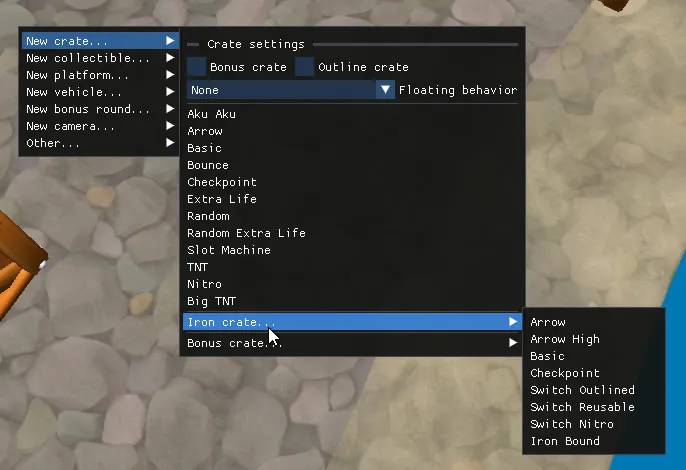
Crates
Section titled “Crates”New crate... lets you create the different types of crates available in the game. The top of the submenu contains settings that apply to the crate you are about to create:
- Bonus crate: create the bonus-round variant (you can change it manually afterwards).
- Outline crate: create the outlined variant. See Outline switch crate.
- Floating behavior:
Noneor one of the floating, water or physics behaviours. (physics demo).
| Submenu | Types |
|---|---|
| New crate… | Aku Aku, Arrow, Basic, Bounce, Checkpoint, Extra Life, Random, Random Extra Life, Slot Machine, TNT, Nitro |
| Iron crate… | Arrow, Arrow High, Basic, Checkpoint, Switch Outlined, Switch Reusable, Switch Nitro, Iron Bound |
| Bonus crate… | Tawna, Brio, Cortex |
| Also available | Big TNT, Nitro (not bouncing), Fake Nitro |
Collectibles
Section titled “Collectibles”New collectible... lets you create any of the available collectible types.
| Submenu | Types |
|---|---|
| New collectible… | Wumpa Fruit, Extra Life, Aku Aku, Crystal, Time Trial, Bonus Tokens, Colored Gems… |
Platforms
Section titled “Platforms”New platform... lets you create platforms, teleporters and level entrances.
| Submenu | Types |
|---|---|
| Gem platform… | Static Gem Platform, Floating Gem Platform |
| Teleporter… | Fade Teleporter, Warp Teleporter |
| Level entrance… | Crash 2 Hub Level Entrances, the portals used by custom hubs |
Vehicles
Section titled “Vehicles”New vehicle... lets you create the rideable objects and their dismount points.
| Submenu | Types |
|---|---|
| New vehicle… | Hog (C1), Bear, JetBoard, Jetpack (C2), Tiger, Baby TRex (C3) |
Bonus rounds
Section titled “Bonus rounds”New bonus round... imports an entire bonus round into the level.
| Submenu | Types |
|---|---|
| New bonus round… | Bonus rounds for Crash 1 (Tawna, Brio and Cortex) and Crash 2/3 |
Cameras
Section titled “Cameras”New camera... lets you add cameras and camera transitions to control how the player sees the level.
| Submenu | Types |
|---|---|
| Spline Camera… | The main camera type for level design. It follows a spline path and provides presets for forward, backward, sidescrolling and vertical sections. |
| Relative Camera | The default camera with a fixed angle and position relative to the player. Mainly intended for testing rather than final level design. |
| Stack Camera | A free camera that follows Crash and can be controlled using external controllers. |
| Camera Box | Creates a smooth transition between the end of one camera path and the start of another. Prefer camera boxes over camera triggers when you need to connect two spline cameras. |
| Camera Trigger | Temporarily switches to a secondary camera when triggered, typically in the middle of a camera path. |
Other... let you create death triggers, collision boxes and chase sections.
| Submenu | Types |
|---|---|
| Death Trigger… | Creates a zone that kills Crash when he touches it. Several death animations are available (falling, burning, drowning, electrocuted…) |
| Dynamic Clip | Creates an invisible box that can collide with the player and/or enemies. |
| Dynamic Clip Switch | Creates a clip that can be activated or deactivated using two separate triggers. |
| New Chase… | Creates a Boulder, Polar Bear or Triceratops Chase. |
| Submenu | Types |
|---|---|
| Select All | Selects every object in the level. |
| Select all NST-compatible objects | (CTR-only) Selects all objects that can be imported into NST, see CTR:NF support |
| Object library | Opens a list of all objects available in the game. See Object Library |