
Checkpoint text
You can change the text that appears when the player breaks a checkpoint crate, as well as its position and speed.
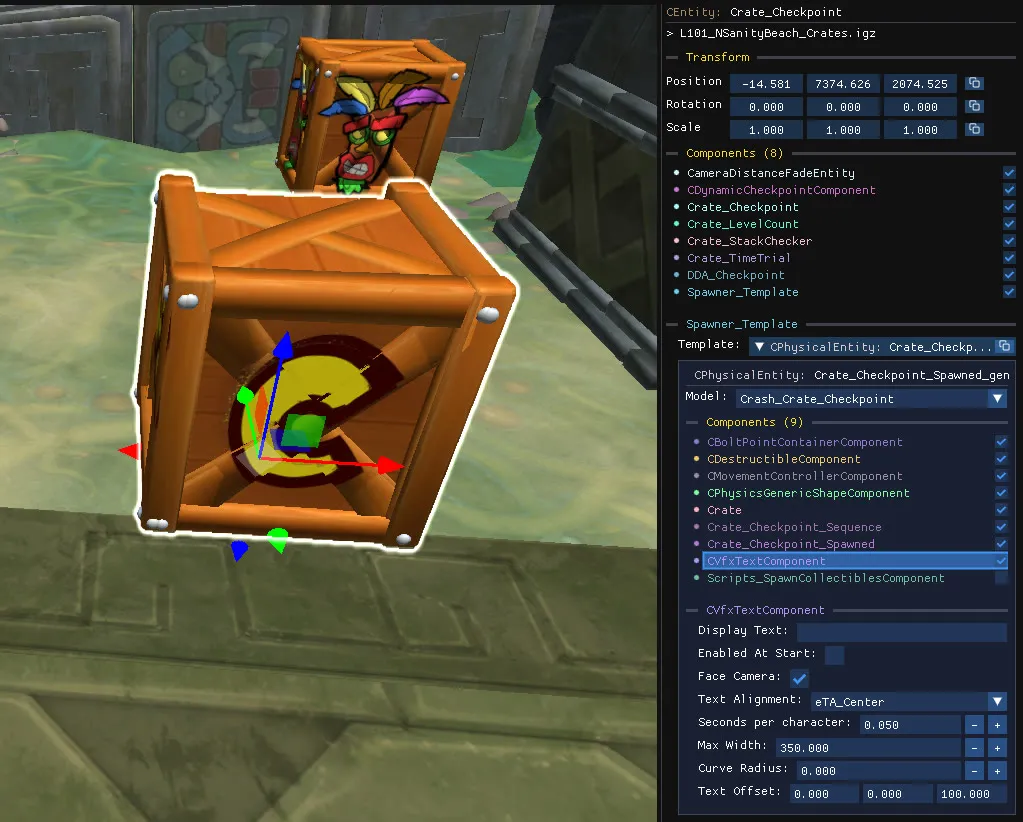
Find the component
Section titled “Find the component”The text belongs to the template object, not to the parent spawner. Select the checkpoint crate, open its Spawner_Template component, then select CVfxTextComponent in the template’s component list.
Properties
Section titled “Properties”| Property | Effect |
|---|---|
| Display Text | The text to display. |
| Enabled At Start | Whether the text is visible before the crate is broken. |
| Face Camera | Keeps the text facing the camera. |
| Text Alignment | Left, centre or right alignment. |
| Seconds per character | Speed of the typing animation. |
| Max Width | Width at which the text wraps. |
| Curve Radius | Curves the text around a radius. |
| Text Offset | Position of the text relative to the crate. |