
Music and audio
Music and sounds live in the SFX group of the object tree.
Main audio components
Section titled “Main audio components”Two main components are responsible for playing audio in a level:
- The
OnStartMusiccomponent (common_OnStartMusicData) is used to set the main audio theme for the level. - The
CAmbientAudiocomponent is used to add environmental looping sound effects in some areas.
Edit audio
Section titled “Edit audio”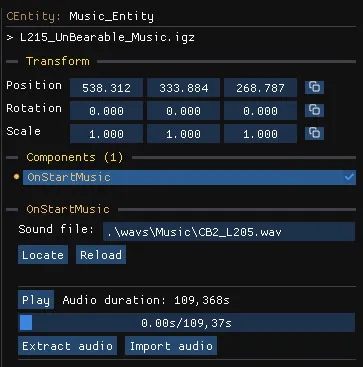
- Play listens to the current track.
- Extract audio saves the track to disk.
- Import audio replaces the track with your own file.
- Locate and Reload find and reload the sound file.
When you create a level from the empty template, the Music option imports the theme of another level as a starting point.
Other audio components
Section titled “Other audio components”CSoundBankListcomponents can be found in some templates that emit sound. Use them to listen or replace the sounds of any entity.CDSPOverridecomponents define an area in which custom audio processing is applied on top of the existing audio, for instance adding reverb to enclosed spaces
For more advanced audio editing, use the audio previews of the archive editor, which can also import custom audio into .snd files, CSoundSample and CSubSound objects.