
Create a new level
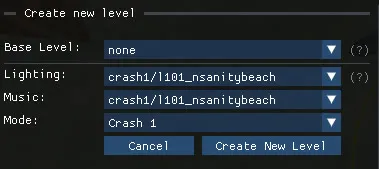
Click New Level… in the main menu. You can either duplicate an existing level or start from the empty template.
Duplicate an existing level
Section titled “Duplicate an existing level”Choose any level as the Base Level. The new level is a complete copy: geometry, enemies, crates, cameras, triggers and music. Edit it freely, the original game files are left untouched.
Start from the empty template
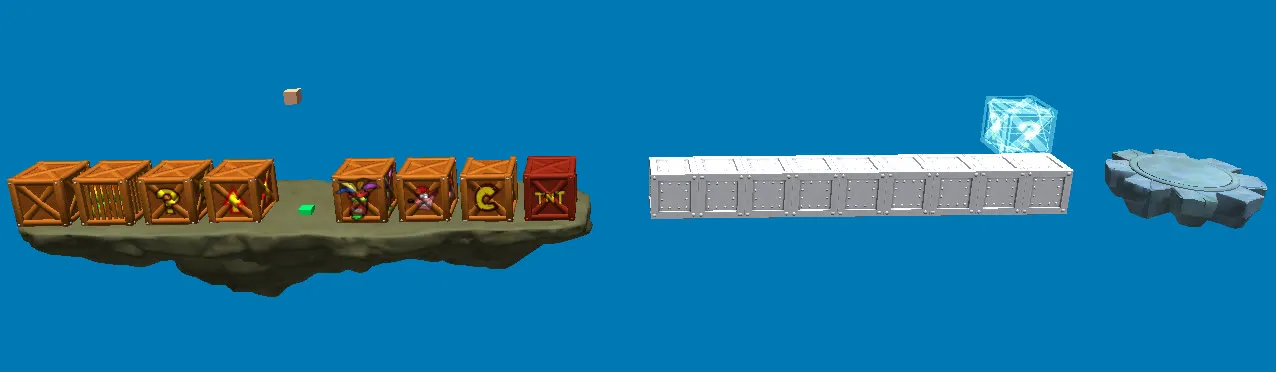
Section titled “Start from the empty template”Choose none as the Base Level. The new level contains only the essentials:
- a camera
- a light source
- a music theme
- a level start and a level end
- a platform with collisions
- the most common crates
- a crate counter entity, so the crate total works at the end of the level
Choosing none unlocks three more options:
| Option | Effect |
|---|---|
| Lighting | Imports the main lighting, ambience and background of the selected level. |
| Music | Imports the main music theme of the selected level. You can still import custom music later. |
| Mode | Crash 1, 2 or 3. It decides how the level start and level end are built, whether to add a crystal, and the style of the pause menu. |
The empty template also sets the death plane (kill plane) in Other → WorldInstance at -500.
Save the new level
Section titled “Save the new level”Custom levels are saved as .pak archives just like regular levels. They are saved uncompressed by default because it is faster when you test often; use File → Compress & Save before sharing. See Play, save and publish.
Next steps
Section titled “Next steps”Give the level a name and a hint in Level settings, then start populating it with the quick-access menu and the Object Library.