
IGZ and Havok editor
Open an .igz or a Havok file from the archive tree to edit the objects it contains. Objects are grouped by type in a tree on the left; click one to display its editable properties on the right. Open in new window detaches the editor, and Expand All and the search bar help you find an object.
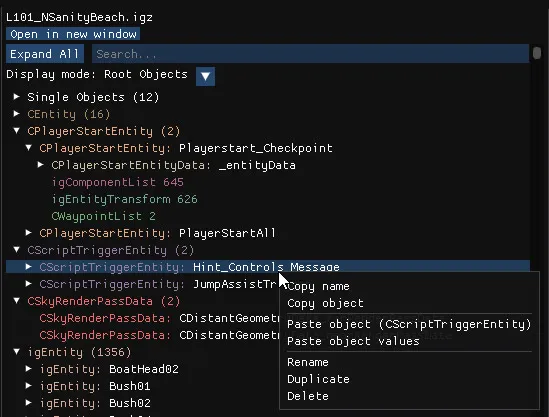
Display modes
Section titled “Display modes”| Mode | Shows |
|---|---|
| Root Objects | The root and parent objects |
| Named Objects | The objects that have a name |
| Updated Objects | The objects you modified |
| All Objects | Everything |
Object actions
Section titled “Object actions”Right-click any object:
| Entry | Effect |
|---|---|
| Copy name | Copies the object’s type and name to the clipboard. |
| Copy object | Copies the object. |
| Paste object | Adds a new object from the clipboard. Objects can be pasted into another file or another archive; their dependencies are imported automatically. |
| Paste object values | Pastes the values into the selected object without creating a new one. |
| Rename, Duplicate, Delete | Rename, copy or remove the object. Deleting an object that others reference cleans up those references. Del deletes the selected object. |
Object properties
Section titled “Object properties”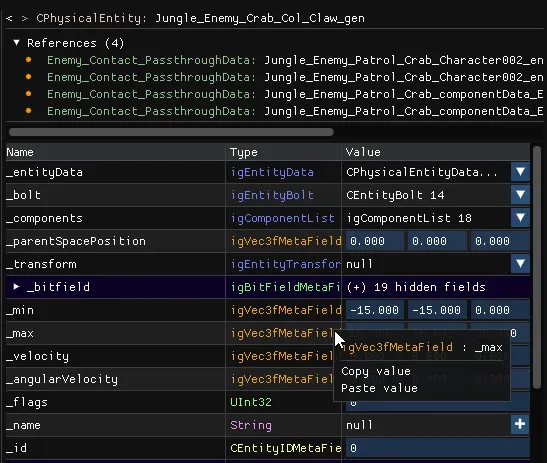
- Click on Navigation arrows go back and forward through the objects you visited.
- The object name and type are displayed at the top.
- References lists every object that references the current one. Click one to open it.
- Hashtable, for objects that contain one, lists its key and value pairs.
- Properties is a table of every field with its name, type and value. Vectors, references, strings, enums and bit fields all have a matching editor.
Editing fields
Section titled “Editing fields”- Right-click a value to copy or paste it, which also works for complex types.
- Object references (
igObjectRef) are dropdowns; you can create a new instance of the right type from the dropdown. - Strings can be set to
null, and a+button creates a value where there is none. - Memory fields let you add and remove elements.
- The field context menu can convert handles to and from EXID and clear memories.
- Not all editing features are available in Havok files.