
Level settings
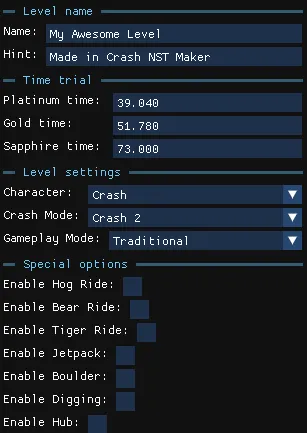
The Level settings panel, at the top of the left column, holds the properties of the current level. These options are only available for custom levels.
Level name
Section titled “Level name”Change the level’s Name and Hint texts show on level load.
Time trial
Section titled “Time trial”Change the Platinum, Gold and Sapphire times, in seconds, for the relics of the level.
Level settings
Section titled “Level settings”| Setting | Effect |
|---|---|
| Character | Who you play as: Crash or Coco. Also includes other hidden/debug characters (CrashBandicoot, BlasterTech, BruiserUndead, TemplateLegacy and WranglerFire). |
| Crash Mode | Crash 1, 2 or 3. Affects the pause menu style and the level start and end. |
| Gameplay Mode | The mode or vehicle the level starts with: Traditional, Swimming, Motorbike, Jetski or Plane. Changing it updates the WorldInstance, the player start and the intro cutscene automatically. |
Special options
Section titled “Special options”Special objects such as rides only work when their toggle is on. If a ride does nothing in the game, check here first.
| Setting | Effect |
|---|---|
| Enable Ride | Required for the corresponding ride objects to work in a custom level. |
| Enable Jetpack | Required for the jetpack. |
| Enable Boulder | Required for boulder chases; fixes the boulder animation. |
| Enable Digging | Enables the digging mechanic found in some C2 levels. |
| Enable Hub | Marks the level as a custom hub. See Custom hubs and modpacks. |